View from inside the viper

Release 1.6.2 Coming Soon

clock April 23, 2013 16:14
by author nigel

Since we released version 1.6.1 of Cart Viper the advanced ecommerce solution we have been busy working on new exciting features that will make up release 1.6.2. Based on user feedback we have identified a series of features that were missing not only from Cart Viper but all the other DNN shopping carts, so with these advanced features we are positioning Cart Viper as the market leading DNN shopping cart.

A few of the new exciting features are:

  • Product catalogue localization – allow the customer to select the language to display your products and categories in.
  • Product and category workflow – define that all changes to products and categories should be subjected to approval by a moderator, including automatic email reminders if moderation does not occur within a given time period.
  • Ability to rollback a product or category to any previous version.
  • Allows products to be tagged using DNN taxonomy.
  • Azure support.

For a full list of features that will make up release 1.6.2 please click here, we are always open to suggestions so if you feel there is a great feature we are missing please let us know.


Go Live Checklist

clock March 14, 2013 20:30
by author nigel

In the rush to put your website live and start taking orders its easy to drop the ball on a simple task, as the old saying goes “You only get one chance to make a first impression”.

With that in mind we have compiled a short checklist of items you should verify before you put your Cart Viper DotNetNuke ecommerce store live:

1) Ensure that the page within your store that contains the “Cart Viper My Account” has the below permissions so “All Users” can view the page. This ensures payment gateways (Paypal, etc) can inform Cart Viper that payment has been successfully taken:
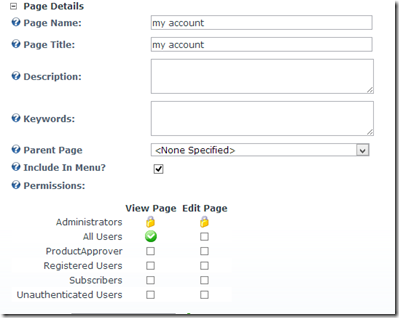
my account 

When setting up the Paypal Standard provider the Secure ID setting is optional and it not the same as your Paypal account page, the correct value can be found in you profile within your Paypal account.

If you are getting an email from Paypal to say you have received payment but don't get one from Cart Viper or see the order in the back office then this is an indication that the IPN is failing and the points above should be the first things to check.

2) Test the SMTP settings on your DNN installation are valid, these settings are located in:

host –> host settings –> SMTP

We use these SMTP settings to send the various emails the store generates, if you receive an error when clicking “test” please contact your ISP to rectify this:
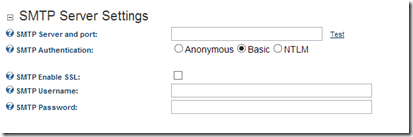
smtp

3) Check the default portal alias for your store has the www.mydomain.com as the primary domain rather than mydomain.com. To check this go to:

admin –> site settings –> advanced settings –> portal alias

If the www.mydomain.com is not listed, simply add this new domain and mark this as the default alias:
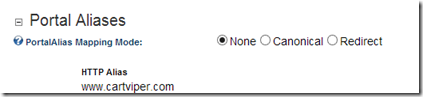
alias

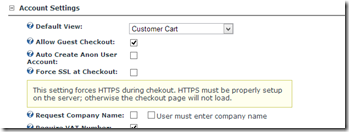
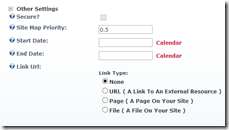
4) If you are using a payment gateway that collects the customers credit card information directly on your website (Authorize.net, Paypal Pro, etc) ensure that there is a valid SSL certificate for your website installed on the server and that the page with the “Cart viper my account” module is served over HTTPS.

This can be set at the DNN page level or within the Cart viper my account module settings:
ssl      ssl2

Note if you are using a payment gateway that requires an SSL certificate and it is not configured correctly we will output a message informing you of that and your customers will be unable to checkout.

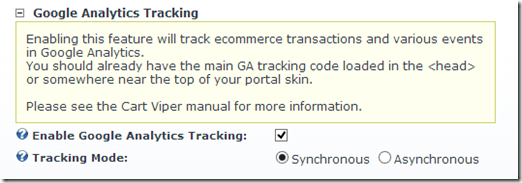
5) Within Cart viper it is possible to allow Google analytic ecommerce tracking, if you are going to enable this setting it is very important that you also add in the Google analytic tracking code to your websites skin. Without this tracking code you will receive javascript errors on your website and the add to cart functions will cease to work. Page 38 of our user guide explains this in more detail:
ga

In our experience the above 5 are the most commonly over looked items when stores are being moved from test to a production environment, if you think we have missed an important aspect or have an idea how we can improve the process please feel free to add it to the post.


Mobile DotNetNuke Ecommerce Store

clock February 12, 2013 16:55
by author nigel

Working in conjunction with our friends over at ITX we were tasked with allowing Cart viper to provide a mobile DotNetNuke ecommerce store for the Cathedral Company website.

The key requirement for this project was that when viewing the Cathedral Company website on a mobile device the layout would be optimised for a mobile viewing. One of the new features in version 6.1 onwards of DotNetNuke was mobile support, this allowed DotNetNuke to detect if you were viewing the site on a mobile device and then if necessary redirect you to a mobile optimised rather than the standard website.

With this great feature at our disposal we set about creating a series of modules that could display Cart viper categories and products that were optimized for mobile viewing. The end results gives the user a mobile friendly experience when viewing the site on their mobile device allowing for quick page loading times when browsing the store categories and products, but not sacrificing functionality or user-ability.

Site when viewed on mobile device:

photo photo

Site when viewed on non-mobile device:

standardSite 

With the increased number of customers browsing and shopping from their mobile devices this is a must have for ecommerce solutions, if you are interested in learning what mobile functionality Cart viper can offer your DNN site, please drop us a line.


Providing First Class Support

clock February 5, 2013 10:05
by author nigel

Here at Cart Viper we understand that without first class support no matter now great your product is it will fail, customers need to have 100% confidence in you to quickly assist with any issues they may have. Along with the confidence the product continues its development life cycle with new and innovative features added and enhanced that will ultimately translate to more sales for your store.

We like to think we have a great balance between an excellent product and customer support. We recently spent some time working with Debt - Proof Living and they had some kinds words to say about the quality of our work:

“We have been so pleased with Cart Viper. The level of customer support the Cart Viper team has provided is beyond exceptional. It's difficult these days to be able to find developers who are able to understand what you need from not only a technical standpoint - but also from a business and marketing perspective.

Nigel and Mark are able to understand and provide support on both fields. We've worked with them on creating a few custom additional add-ons and the pricing has not only been reasonable but the job is always completed in a timely manner. They don't rest until everything is set up correctly and it works exactly how you intended. I highly recommend the Cart Viper platform and we are very satisfied in our experience thus far.”

Max Halberg, Director of Digital Marketing for Debt-Proof Living

Cart Viper offers different levels of support ranging from community to enterprise to ensure there is a support option to fit any budget and support level your organisation requires to ensure instant response to your queries and questions.

If you would like to discuss which support plan would best suit your organisation please drop us a line.


Innovative Cart Viper Sites

clock January 29, 2013 18:51
by author nigel

Here at Cart Viper the advanced DotNetNuke ecommerce solution we value innovation and taking the basic Cart viper template and token system and pushing it to its limits. By utilizing the token system and skin objects feature Cart viper supports it is possible to create highly customized, innovative and styled ecommerce solutions.

The below sites highlight how writing a skin object can add additional functionality to your site to make it stand out from the crowd, improve usability and ultimately sales:

www.cerez.co.uk

ceres

www.imaginz.co.nz

imaginz

www.purplecateducation.com

purplecat

www.electrocorder.com

acksen

www.startwithwhy.com

startswhy

In many cases we worked together with the website owner to produce the end result, if you have a requirement or want to highlight your innovative Cart viper solution please let us know.


Cart Viper Release 1.6.1 – Admin reply to product reviews.

clock January 18, 2013 18:05
by author nigel

Cart Viper the DNN ecommerce solution has supported customers leaving product reviews since version 1.0, however in release 1.6.1 we have added in the ability for the store owner to respond to product reviews and have the admin comments outputted along with the product review.

This new feature increases the ability for the owner to communicate with their customers and encourages a more social aspect to your store.

Responding to a review is straightforward simply select the review you want to reply to from the review admin section and you will be greeted with the below UI:

admin review reply

Once your reply has been saved it will then be outputted below the original customers review:

review response

The admin reply is purely driven by CSS, so you are free to format this as per your needs to match the look and feel of your existing site. This as well as numerous new features are available in Cart Viper 1.6.1 that comes complete with a free 14 day trial.


New Payment Gateways Added in Release 1.6.1

clock January 10, 2013 17:51
by author nigel

Along with the many great new features in version 1.6.1 of Cart Viper the advanced DNN shopping cart we have integrated into 9 new payment gateways!

The new payment gateways we have added support for are:

Combined with these we have also added support for 2 new currencies:

  • New Zealand dollar
  • Philippine Peso

All the above features were requested by clients and highlights how flexible and extendable Cart viper is. If you have a requirement for a new payment gateway, currency or any other feature we do not currently support let us know and we would be happy to discuss these with you.


Cart Viper 1.6.1 Multiple Shipping Providers Support

clock January 9, 2013 20:00
by author nigel

One of the great new features of version 1.6.1 of Cart Viper the advanced DNN shopping cart is the ability to support multiple shipping providers. The advantage of this is you could enable any combination of the Cart viper shipping providers and then the customer can select which provider they would like to use when they complete their order:

  • Default (Cart viper internal shipping bands)
  • FedEx
  • UPS
  • USPS

Configuring this option is straightforward, simply select the shipping providers you would like to enable from the shipping admin complete all the relevant settings for the shipping provider and select “Shipping Provider Is Active”

Screenshot_1

Once completed the customer will be presented with the below options when they checkout, giving them the ability to select the shipping option they prefer:

Screenshot_2

Stay tuned because over the coming weeks we will be bloging on more of the great new features in release 1.6.1.


Cart Viper 1.6.1 Released

clock January 4, 2013 12:20
by author nigel

Here at Cart Viper the DotNetNuke ecommerce solution we hope you have had a great vacation, now the new year is upon us we are delighted to release version 1.6.1 of Cart Viper the most feature rich and best supported DNN shopping cart. This version is bursting at the seams with 80 new features and enhancements, some of the highlights are listed below however click here to view the full feature list for this release:

  • Support multiple shipping providers e.g. UPS, FedEx, USPS and let the customer select which one they would like to use at the point of checkout.
  • Google product feed support.
  • Add “buy now” price to events, so they can either be rented on a given date or purchased now for the buy it now price.
  • Define if a digital download attracts shipping costs.
  • 9 new payment gateways! including Barclays EPDQ, Virtual Merchant and Sage Pay forms.
  • Allow admin to respond to product reviews.
  • Upload an unlimited number of product datasheets.
  • Allow admin to define the units of measure the store will use e.g. CM, MM, LB, KG
  • Create shipping bands based on zipcodes.
  • Define zipcode’s that the store will not deliver to.
  • Allow customer to optionally select a delivery date and time.
  • Support New Zealand dollar and Philippine Peso currencies.

2013 is going to be a busy year here at Cart viper we have already got a full feature list for our next release if you think there is a feature missing from that list please contact us and we would be happy to add this.

Please take our free 14 day trial and as ever any feedback good or bad please let us know!

Best regards

Nigel.


Cart Viper Silverlight Image Uploader Control

clock March 5, 2012 16:07
by author nigel

Back in version 1.5.1 of Cart Viper the DNN shopping cart we implemented a new feature that allowed the store admin to upload multiple product images simultaneously.

To achieve this we created a Silverlight control, a trade off we had to make when we implemented this feature is that if you are using version 6 of IIS the Silverlight mime type will not be there by default (version 7 onwards has this in by default). This means that the control cannot be rendered to the page and when you go-to the product image upload section you get a blank screen.

In order to fix this you need to add the Silverlight mime type to IIS, the following link provides a great example of how to achieve this under the section “Using the IIS Manager User Interface in IIS 6.0 in Windows Server 2003” – note upon completing the steps an IIS restart may be necessary.

Once you have completed the above the image up-loader control should then be rendered to the page allowing you to upload multiple images simultaneously and making managing your store with Cart Viper even easier!

CropperCapture[4]


Feed Subscribe

Calendar

<<  May 2013  >>
MoTuWeThFrSaSu
293012345
6789101112
13141516171819
20212223242526
272829303112
3456789

View posts in large calendar

Sign in